


When the magic button doesn’t work…
Your Mercedes-Benz key fob is the first touchpoint of luxury—until it acts up during a busy Fresno morning. Whether the doors won’t unlock in the River Park parking deck, or a *“Key Not Detected”* alert pops up by Woodward Park, this guide covers ID’ing your key, battery swaps, quick fixes, and when to call the pros.
What kind of Mercedes-Benz key do you have?
Classic SmartKey® (black plastic casing)
- Durable black housing with a separate panic button.
- Common on earlier Mercedes-Benz models.
Typical battery: CR2025 × 2
- Open your fob to confirm.
- Mushy buttons after heat cycles can indicate a worn internal rubber pad.
Chrome SmartKey® (modern metallic/chrome finish)
- Sleek design; circular or triangular panic button variants.
Typical battery: CR2025 × 1 CR2032 × 1
- Match the number on the cell you remove.
- Some versions require the thicker CR2032—check the printed battery size.
Good to know: Battery type can vary by year/variant. Open the fob and read the number on the cell before buying a replacement.
DIY Battery Replacement
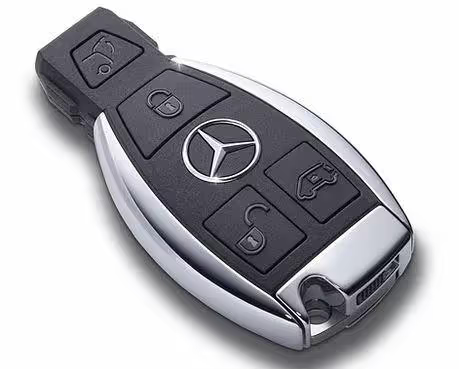
Older SmartKey® (black)
- Release the mechanical key: slide the end tab and pull out the metal key.
- Open the fob: insert the key tip into the slot and gently pry the cover.
- Swap both cells: note polarity; replace with two fresh CR2025s.
- Reassemble: snap the cover, then slide the key back in.
Typical battery: two × CR2025. Dispose of coin cells properly; keep away from children/pets.
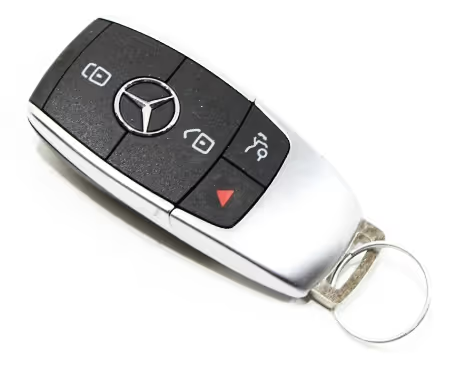
Chrome SmartKey® (modern)
- Pop the emergency key: press the small square tab; remove key from the top.
- Press inner latch: use the key tip inside the opening to release the back cover.
- Replace the battery: invert & tap to drop the old cell; install CR2025 or CR2032, (+) side up.
- Reassemble: hook the front edge, click shut; slide the key back in.
If the cover won’t seat, double-check the battery thickness (CR2032 is slightly thicker).
Programming vs. battery change: Swapping a battery doesn’t program a key. If it still won’t work, see Troubleshooting.
Troubleshooting

Water Exposure
Remove battery immediately, dry thoroughly (no heat guns). Corrosion can appear later; intermittent issues may follow.
If submerged, replacement is often the durable fix.
Call a pro if: the fob is totally unresponsive, “Key Not Detected” persists, there’s physical damage, or antenna/module faults are suspected.
Lost your key? Replacement & Security
Modern Mercedes-Benz keys are encrypted and paired to your vehicle’s immobilizer. For most late-model cars, programming a new key requires authorized equipment; DIY programming isn’t supported.
What you’ll need
- Driver’s license & registration
- VIN to order the correct key
- Vehicle present for programming/testing
Why dealer-programmed?
Authentic keys, encrypted pairing
De-authorizes lost keys for security
Verifies remote & mechanical functions
Avoid pitfalls: Many aftermarket fobs can’t be paired to recent Mercedes systems and may be refused for programming.
The Future: Mercedes-Benz Digital Vehicle Key
Select newer models support a Digital Vehicle Key, letting you lock, unlock, and drive using a compatible iPhone or Apple Watch—plus share access with family members. Setup is managed through Mercedes me connect; compatibility varies by model, year, and device.
- Uses NFC/UWB proximity for secure access on supported vehicles/devices.
- Keys can be shared to multiple devices with customizable permissions.
- Power reserve on supported phones can keep the key working briefly even if the phone battery is depleted.
Compatibility check: Features and setup steps differ—verify availability for your exact model/year and device.
FAQ — Mercedes-Benz Key Fobs (Fresno)
How much is a battery and which one do I buy?
Most fobs use **CR2025** or **CR2032** coin cells; older SmartKey® often uses **two × CR2025**, while many Chrome SmartKeys use **one × CR2025 or CR2032**. Open your fob and match the number printed on the existing cell before purchasing.
Can I program a new key fob myself?
For most post-2015 vehicles, **no**. New keys require secure, authorized programming equipment. Some older models allow simple resync after a battery swap, but that isn’t “programming” a new key.
Why does it say “Key Not Detected” with a new fob battery?
Interference, a weak vehicle 12V battery, a damaged fob, or an antenna/module issue can all trigger it. Try your spare key to isolate fob vs. vehicle.
How long do key fob batteries last?
Typically **2–3 years**, depending on usage and climate. Continuous KEYLESS GO® proximity checks can shorten life slightly.
What’s the difference between SmartKey® and KEYLESS GO®?
**SmartKey®** refers to the fob itself; **KEYLESS GO®** is the passive entry/push-start feature that uses the fob without pressing buttons.
Will Digital Vehicle Key work with my phone?
It depends on your model/year and device. Check compatibility before relying on it for daily use.
Need help in Fresno? Local technicians can test your fob, check antennas, and handle secure replacements. (Add your preferred contact method here.)
History & Glossary
- 1998 — KEYLESS GO® debuts: Mercedes-Benz introduces passive entry/start on the W220 S-Class.
- SmartKey®: The physical fob that communicates via LF/RF with the vehicle’s security modules.
- Digital Vehicle Key: Smartphone-based access on supported models/devices, using NFC/UWB and the Mercedes me ecosystem.